Showing posts with label stashtally. Show all posts

Friday, March 2, 2018

Stash Tally Update

So, let's see where I'm at!

Total Fabric (incl fabrics on order but not delivered)

1st Jan            441 metres
28th Jan          443 metres
2nd Mar           441 metres

Between 1st Jan and 2nd March, I've added 10 metres bought locally, added another 2.5 metres to my UK pre-order (which has now filled the box so won't be buying any more), and decided that I just HAD to have 1 yard of something else I saw for pre-order (can't show you a picture until it arrives though because the pictures all get taken down once the pre-order closes).

Given how much fabric I've added, I'm impressed that my total is not more, so I'm still happy with my progress, even though I haven't actually reduced my stash.
Although I don't feel like I've done enough sewing to justify it, so I can't shake the feeling that I've missed something somewhere....


Clothes to be upcycled

1st Jan           126
2nd Mar         126

I have used up some of the clothes, but I've obviously added a few, or updated things that were in the box but not on the list.


Unused Patterns

1st Jan           201
2nd Mar         197

Since 1st Jan, I've bought 2 new patterns (Miss Ruby Tuesday, and Slash Tunic), and picked up a couple of free ones, so am glad to see the number drop a little.


Whilst I'm moving in the right direction (or at least not moving in the wrong direction), I think I need to lift my game a little if I want to make significant progress by the end of the year.


Tuesday, February 6, 2018

Pattern Organisation

Following on from my post the other day, I'd like to share the pattern organisation database I use on my phone.

For those that haven't read the previous post, I use an Android App called Memento Database. Memento is a totally customisable database (library) App, so you can set it up however you would like. I have one library for patterns and one for fabric.

This blog post is about how my pattern database is set up, not specifically about how to use Memento. I've mostly worked it out as I went along or Googled, so if you would like specific instructions for anything, please comment below and I can try to answer your question.

The following screen shots show the fields I have set up:


Photo - this is usually the cover photo of the pattern. There is space for two photos so if the pattern has lots of options I take a photo of the line drawings from the pattern. For PDFs I am currently taking a photo of my computer screen when I have opened the PDF.  It's not ideal but it works for now.  I think if I wanted to go to the websites of the designers and download the images, I could add them into the app but that just sounds like too much work for me on my phone.

Pattern Company - obviously the name of the company/designer.  This field is set up to auto-complete, so when you start typing the first few letters it gives you options to choose from (if you have previously entered data).  You don't have to choose a Name from the list of options as it will create a new entry but doing some means that you run the risk of having two slightly different versions of the same thing if you're not careful

Here is the auto-completed pop-up for the Pattern Company

Pattern Number - This is labelled as 'number' because I started with paper patterns from the Big 4, but since I started entering PDF patterns I use it for the pattern name. It won't let me change the title as I have linked the database to Google Sheets, but you might be able to change it.

PDF - Just a tick box to indicate if the pattern is PDF or not

Sizes -  I enter all the sizes separated buy commas, so "14, 16, 18" or "S, M, L". Again this field is auto complete so as you go you'll build up many entries that you can select from.  If you need to enter something that is similar but not the same as an auto-complete option, you can select that option then edit it to add/remove sizes as needed.

Here is the auto-complete pop-up for sizes.
You end up with lots of entries/options, but it's easier enough to scroll and select what you want.

Photo - This photo field is for the back of the pattern envelope info. The size measurements, fabric requirements etc.  For PDFs I again take a photo of my computer screen whilst displaying the relevant information in the document.  The images come out looking a little funny because of the screen/light but I still find them readable for fabric qty etc.

Recipient - click on the arrow and a list pops up. You can select as many options as you like. This just helps when searching for patterns.


Categories - again a pop up list that you can select multiple options. 

Notes - free text field for any extra information. I sometimes find that PDF patterns don't tell you the fabric type in the same spot as the requirements, so it doesn't appear in the above photos. I just make a note of it here

Woven/Knit - tick boxes for making search easier.  I sometimes use the Group function to separate out patterns which use Knit or use Woven if I have a particular fabric in mind.

Projects - I make a note of what I've used the pattern for. This is what I use to keep track for my stash tally (see below)

Extra Photos - I added this field recently because a PDF pattern came with so many extras that I couldn't fit them all into the main photos.  In the free version, you can only add two photos to each photo field, but you can create as many photo fields as you'd like.

Here is a complete entry for a paper pattern


Here is a complete entry for a PDF pattern.  This is the one that required me to create the "extra photos" field!


Memento also has a pretty handy sorting and filtering ability that makes looking up an item easy. If you swipe left when on the database list, it will reveal the menu on the right side of the screen.  Here you can Sort, Group and Filter.

Whilst I mostly used the Group function for fabric, to search my patterns, I mostly make use of the Filter function to find what I'm looking for.

I have several filters set up to create tabs at the top based on the category of the pattern.  You can gently swipe left to reveal more off the right of the screen.


I then swipe left to access the filter option and select my recipient


And I am shown a list, in this instance, of dress patterns for women

You can also see at the bottom of the screen there is a count of the number of entries.  As you select different tabs at the top, the numbers change so it gives you a count of how many items in that category.  This is what I'm using to keep track of my Stash Tally for the year.  If I select the All tab, with No Filter, then group by Projects, that 'Empty value' group at the top tells me how many patterns I have that I've never used.


It has taken me some time to develop this database to its current state, but it's what I have found most useful for me.  It also took me quite a long time to enter everything.  I would do it in batches, and I still sometimes come across things that have been missed.  But this set-up allows me to sort/filter and group to quickly find patterns for a project, either based on what I want to make (skirt, pants, dress etc) or how I can use up a particular piece of fabric (this is when I group by knit/woven).

If you would like to see how I’ve set it up, I have shared my template, so you can search for it within the App rather than setting it up yourself!!  If you go to 'Add Library', choose 'Online Catalog', then search for 'sewing patterns', I'm there! (pinstripes).  I have not downloaded a template before, but I'm assuming once you do, you can edit the set-up to suit yourself.


Tuesday, January 30, 2018

Fabric Organisation

A question I’ve often seen asked in Facebook sewing groups (I'm in a lot) is what smartphone apps are there to organise their fabric or pattern stash. Today I was messaging someone with screen shots of what I've done etc, so I decided to make a blog post out of it and share with everyone.  I'm not saying this is the only way to do it, but this is how I do it.

To keep track of my fabric stash, I use an Android App called Memento Database. Memento is a totally customisable database (library) App, so you can set it up however you would like. I have one library for patterns (which actually came first) and one for fabric.

The basic version is free and has a number of limitations, and while I have never used it, also comes in desktop versions for Windows, Linux, and Mac. In order to sync libraries across to the desktop version you need to use Memento Cloud, with the free option limited in space and libraries. I might upgrade later (upgrade is via subscription), but for now I'm happy with just mobile.

This blog post is about how my fabric database is set up, not specifically about how to use Memento. I've mostly worked it out as I went along or Googled, so if you would like specific instructions for anything, please comment below and I can try to answer your question.

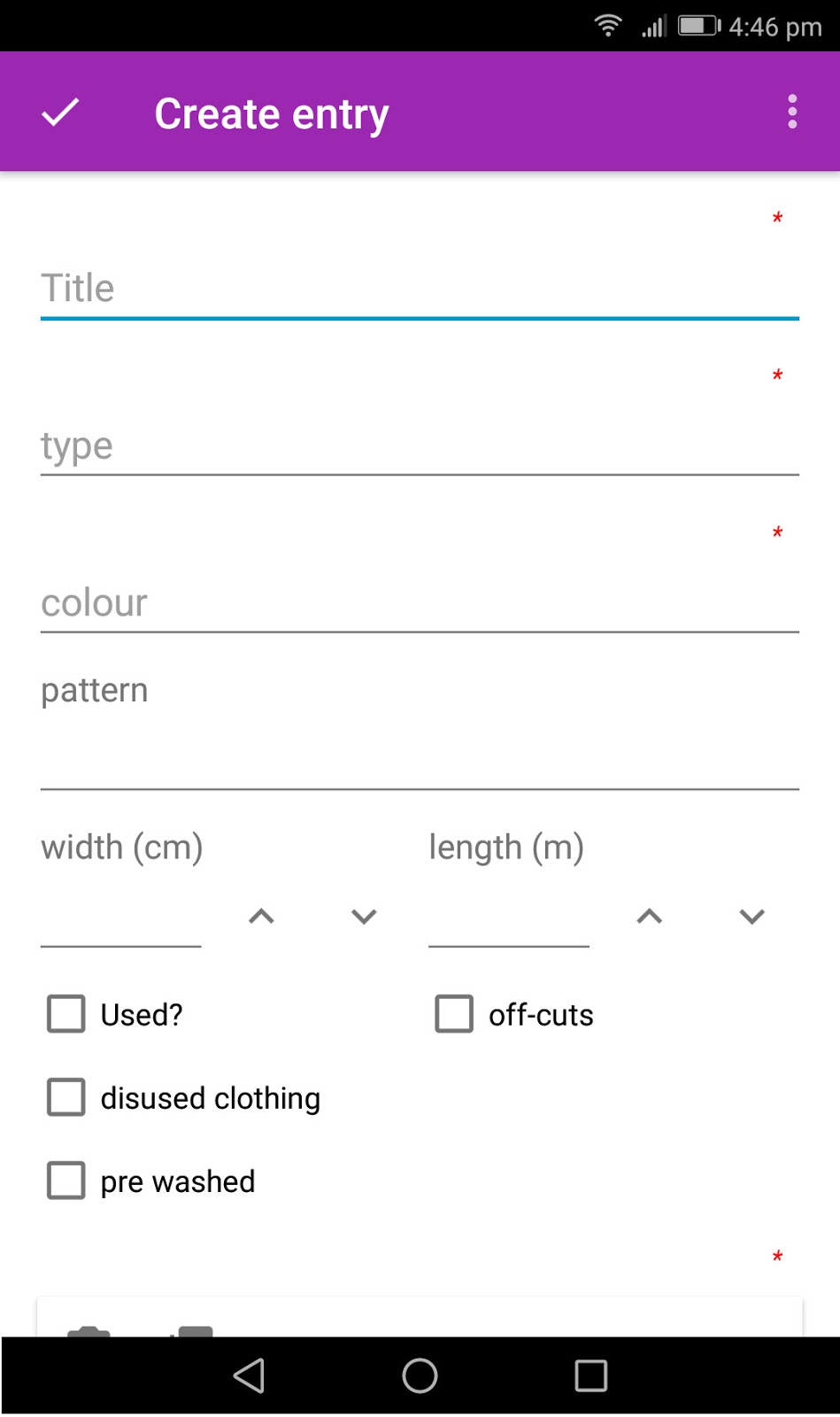
The following screen shots show the fields I have set up:


Title - (mandatory) this is just something I use to identify the fabric for myself.  Most often it will be a repeat of the colour and/or type because I'm unimaginative. Sometimes it will be a previous project made with that fabric, or what the fabric is destined to become.  This entry does not need to be unique, just so long as you know what it is.

Type - (mandatory) this is how I choose to categorise the fabric. I have entries such as 'knit', 'polar fleece', 'cotton', 'woven stretch'. This field is set up to auto-complete, so when you start typing the first few letters it gives you options to choose from (if you have previously entered data). You don't have to choose a Type from the list of options as it will create a new entry but doing so means that you run the risk of have two slightly different versions of the same thing if you’re not careful.
Auto Complete box popping up once 2 letters have been entered. 
You can select which entry you want, or just keep typing to create a new one.

Colour - (mandatory) this is fairly obvious. Since it's mandatory, I've often entered 'multi' if I can't think what to call it. Again, this field has auto-complete, so you can make sure things end up together.

Pattern - I'll sometimes put 'stripes', 'spots' etc here.  It's rather obvious from the photo (further down) what the pattern is but entering it in this field means you can Group by pattern if you are after a specific one.

Width - in centimetres, so you would enter 112 or 150 for example.  I have some entries that are 80 (for example) because I've used a long strip down the length.

Length - in metres, so you would enter the value as 1.5 or .60 for example.

Used? - I use this tick box to indicate when I've used the fabric but forgot to mark it down. It just reminds me that the full length as listed will not be there.

Off Cuts - I use this to indicate that there are off cut pieces that I haven't included in the measurements (obviously larger, usable pieces). This box can be ticked in addition to width/length above, like when you cut something from a length and you have all the funny shaped pieces at the end.  Or it can be ticked on its own with no width/length to indicate that there are just "bits" left over that might be usable.

Disused Clothing - I use this instead of entering width/length when it is clothing I wish to up-cycle.  Some items I have stored I want to refashion, but others I just intend to cut up for kid’s clothes etc, so in my head they are just classed as fabric.

Pre-washed - to indicate whether the fabric is pre-washed or not.  If I intend to pre-wash, I try to do it straight away before adding it to my database, but just in case, you can remind yourself if you have or not.


Photo - Obviously a photo of the fabric.  The free version allows you to have two photos in this field.  I just take something to show the colour and/or pattern.  Sometimes the colour doesn't come up very well but it's usually enough to remind me of what it is.

Storage Location – This is handy to remind me where it is amongst the rest of the stash.  For me this would be things like "computer box" (I got a new computer the other week), "Blue crate", "1 - top shelf" (meaning first pile on the top shelf).  This is also an auto-complete field so I've tried to make the first few letters unique (hence my top shelf starts with the number), because then I can quickly choose my option without having to scroll or type lots of letters.

Project - This is just a free text field to list projects I have done or intend to do with this fabric.  Sometimes listing an old project reminds me of exactly what fabric it is when the colour/type/photo are a bit generic.

Notes - Just a free text field.  I've taken to putting in here how much I paid for it (usually if it was a good price!), or what percentage stretch it has etc.

Sewing Patterns - This field is to link it to my Sewing Patterns database, so if this fabric has an intended purpose I can actually link it directly to the pattern I want to use it on. (I'm planning another blog post about my Pattern database so I'll talk more about that then).


Memento also has a pretty handy sorting and filtering ability that makes looking up an item easy. If you swipe left when on the database list, it will reveal the menu on the right side of the screen.  Here you can Sort, Group and Filter.

My default sorting is by length.  I think the only time I change this is when I sort by Creation Date to quickly find an entry I just recently put in.

Most often I have my fabrics grouped by Type because if I'm looking for something for a specific project, that's the main factor.  Recently I was reorganising, so I grouped the list by storage location which allowed me to check what should be in what box and where.  I have also sometimes sorted by Colour or Pattern if that is more important to my project than Type

I don't often use a filter for my fabrics, but filters allow you to create tabs at the top of the list. This quickly allows me to filter out clothes, and only see lengths of fabric for example.
Here you can see Grouped by fabric type with the knit group expanded.
You can also see the tabs across the top, so I can quickly change between different filters.


You can also see at the bottom of the screen there is a count of the number of entries.  As you select different tabs at the top, the numbers change so it gives you a count of how many items in that category (on the left) and total number of metres (on the right).  This is what I'm using to keep track of my Stash Tally for the year.

It has taken me some time to develop this database to its current state, but it's what I have found most useful for me.  It also took me quite a long time to enter everything.  I would do it in batches, and I still sometimes come across things that have been missed.  But this set-up allows me to sort/filter and group to quickly find fabrics for a project, without having to empty all my fabric stash out and measure individual lengths, so the time has been well worth it.

If you would like to see how I’ve set it up, I have shared my template, so you can search for it within the App rather than setting it up yourself!!  If you go to 'Add Library', choose 'Online Catalog', then search for 'Fabric Stash', I'm there! (pinstripes).  I have not downloaded a template before, but I'm assuming once you do, you can edit the set-up to suit yourself.


Sunday, January 28, 2018

Stash Tally Update

I have a few projects to share, but I never seem to get around to taking photos.  They'll come eventually.

In the mean time, I have done some reorganising today, so I thought it an appropriate time to update my tally.  I was going to do it at the end of the month anyway, so this is near enough.

At the beginning of the month my fabric total was 441 including 8.5 metres on order.  That order is still waiting, so we'll call the total 432.5

On Friday I went looking to buy 3 metres of fabric because I didn't really have anything suitable for an upcoming project.  I was hoping that The Clearance Table Gods would be favouring me.  Well, was I in for a treat!!  They had this stretch pinstripe fabric for $5, less 30%, so $3.50 per metre!  I decided on 10 metres just to be sure.


After bringing that home and adding it to my database, my total was at 432.3!  Clearly I'd used 10 metres in the last few weeks.

After today's sorting out, I've added a total of 8.8 metres (fabrics I already had but weren't in the database), and I also adjusted some fabrics which I'd used previously but hadn't marked off.

My new total is 434.6 metres, so the net effect of updating is only 2.3 metres difference.  Given that my overall total is now only this amount up and I've bought 10 metres, I'm counting it as a successful month, even if it's not exactly on target.

Talking about targets.  Following a comment online somewhere, I worked out that if I'm to live until I'm 90 (not unreasonable with my family history) I'll need to use approx 20 metres each year to use it all up before I die.  This is very achievable!  So that is my goals for the year: to have 20 metres less than I started with.  A little more measurable than "have less".

And in other news, I need to lift my t-shirt sewing game I think, because one of my favourite t-shirts has officially died.  This hole in the front is just a little too big to be wearable. On the plus side, I had tried to trace a pattern off it before but didn't think it was very good, now I can take it apart and make a pattern to work with.

Monday, January 1, 2018

Hello again

I've been contemplating reviving my blog for a little while now, and a new year seems like a good time to start.  So I'll dive right in.

This year I have set myself the goal of ending the year with less than I started. I have databases set up to keep track of my fabric stash, which includes clothes I have kept/bought to upcycle, and sewing patterns with indicators as to whether I have used them or not. At the end of the year I want to have less metres of fabric, less items of clothes, and less patterns that I have never used.

My focus with sewing is firmly set on clothing these days, for me and my kids.  Hoping to fit more time in for hubby and extended family but we'll see what happens.  Last year my goal was to not buy any clothes that I could make.  I did a lot more sewing, and a lot less buying, but I did still buy some things.  Lack of time for sewing meant that I had to buy a few things for the kids out of necessity, and I bought myself a few pieces that I fell in love with.  It did make me really consider what I bought though.  And some of the items I bought I regret because they don't fit that well afterall, so that was a bit of a reminder of why I want to make my own.

So this year I want to turn a good portion of my stash into well fitting, well made and good looking clothes!

As it stands at the moment these are my tallies:

Fabric
Currently on database: 430 metres
On order awaiting delivery: 2.5 metres
On order (in UK) waiting for me to fill postage box: 8.5 metres
It's not absolutely accurate because my database tally doesn't include "lengths" of panels and some larger oddly shaped off-cuts, etc but it's a starting point
Total: 441

Clothes
Currently on database: 126 entries (some entries are for multiple, similar items)

Patterns
Currently on database: 326 total.
Those marked as unused by me: 201.  I'm not sure if this is accurate, some I feel like I've used them but can't remember.  I'll have to dig them out and see if they're cut or not etc, so this figure might get updated.

I think I was going to write more here but have been distracted by kids too many times so I guess I'll have to remember it later

LinkWithin

Related Posts Plugin for WordPress, Blogger...